SkillsTribes

SkillsTribes Maintain · HVAC Maintenance Management System

Every AMC contract, unit and SLA, on one screen.

Keep your clients, sites and equipment in one place, schedule preventive maintenance in one click, and time every complaint against the SLA written in the contract. Your clients get their own portal to raise complaints and see the work you did.

The demo runs on sample data and needs no login. Switch between the contractor view and the client portal at the top.

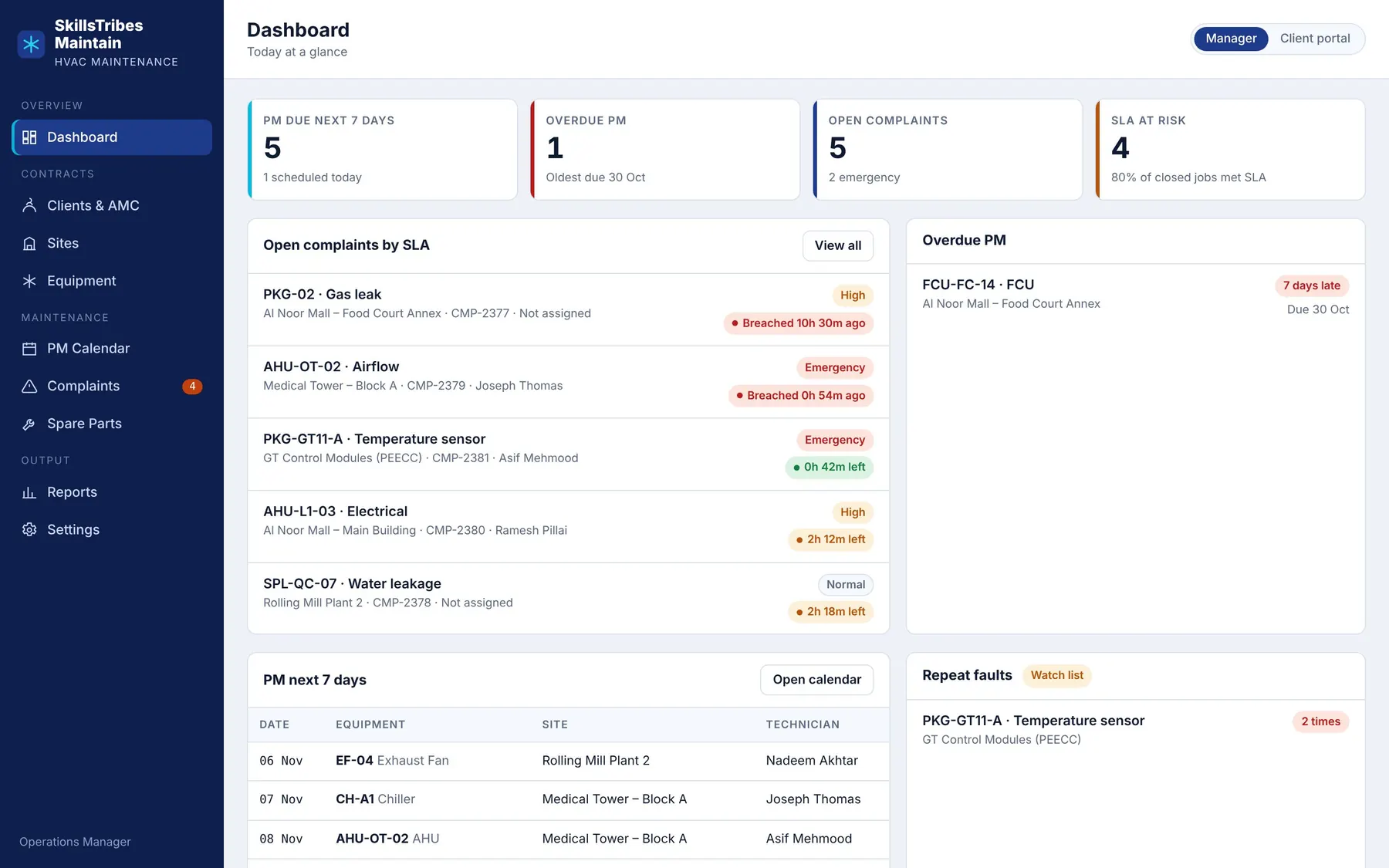
SkillsTribes Maintain dashboard: PM due this week, overdue PM, open complaints sorted by SLA, and repeat faults.
Built for contractors in
  • United Arab Emirates
  • Saudi Arabia
  • Iraq
  • Qatar
  • Oman
  • Kuwait
  • Bahrain

Features

HVAC maintenance software for everything an AMC contractor's office does every day.

Made from how maintenance actually runs on site: PM rounds, breakdown calls, work permits and the monthly report to the client.

Contracts and clients

Every AMC in one place

  • Contract period, value in AED, SAR or USD, and PM visits per year
  • Response time (SLA) for Emergency, High and Normal calls, set per contract
  • Renewals flagged 30 days before the contract ends
  • Sites for each client: malls, factories, hospitals, plants

Equipment

A history for every unit

  • Chillers, AHUs, FCUs, package units, splits, VRF, cooling towers, pumps
  • Tag, model, serial, TR, refrigerant, install date and warranty
  • Age against design life, so you see which units are near the end
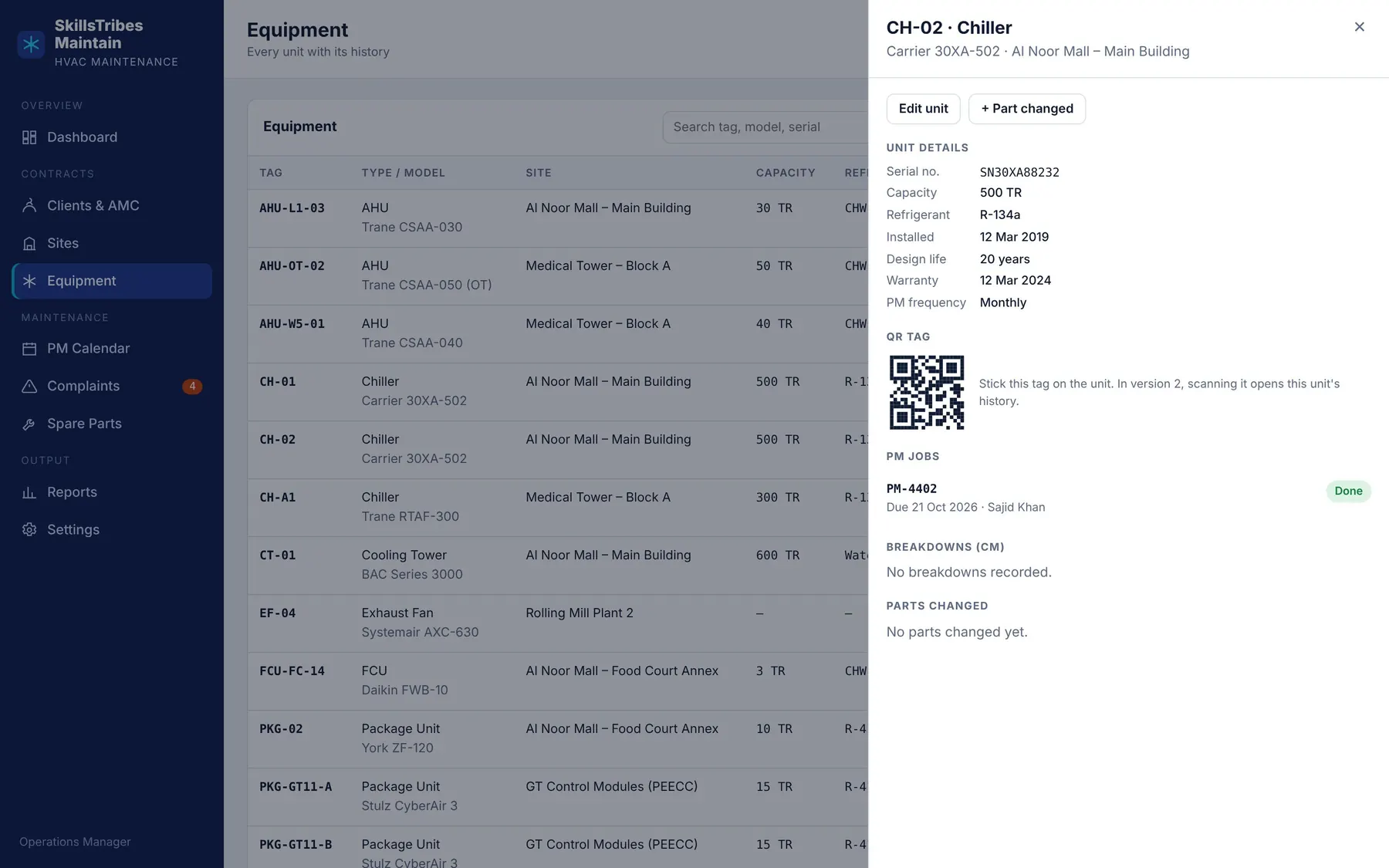
  • One page per unit with every PM, breakdown and part, and a QR tag

Maintenance

PM and breakdowns under control

  • Schedule a month of PM in one click, by each unit's frequency
  • HVAC checklists and readings; a PM closes only when the checklist is complete
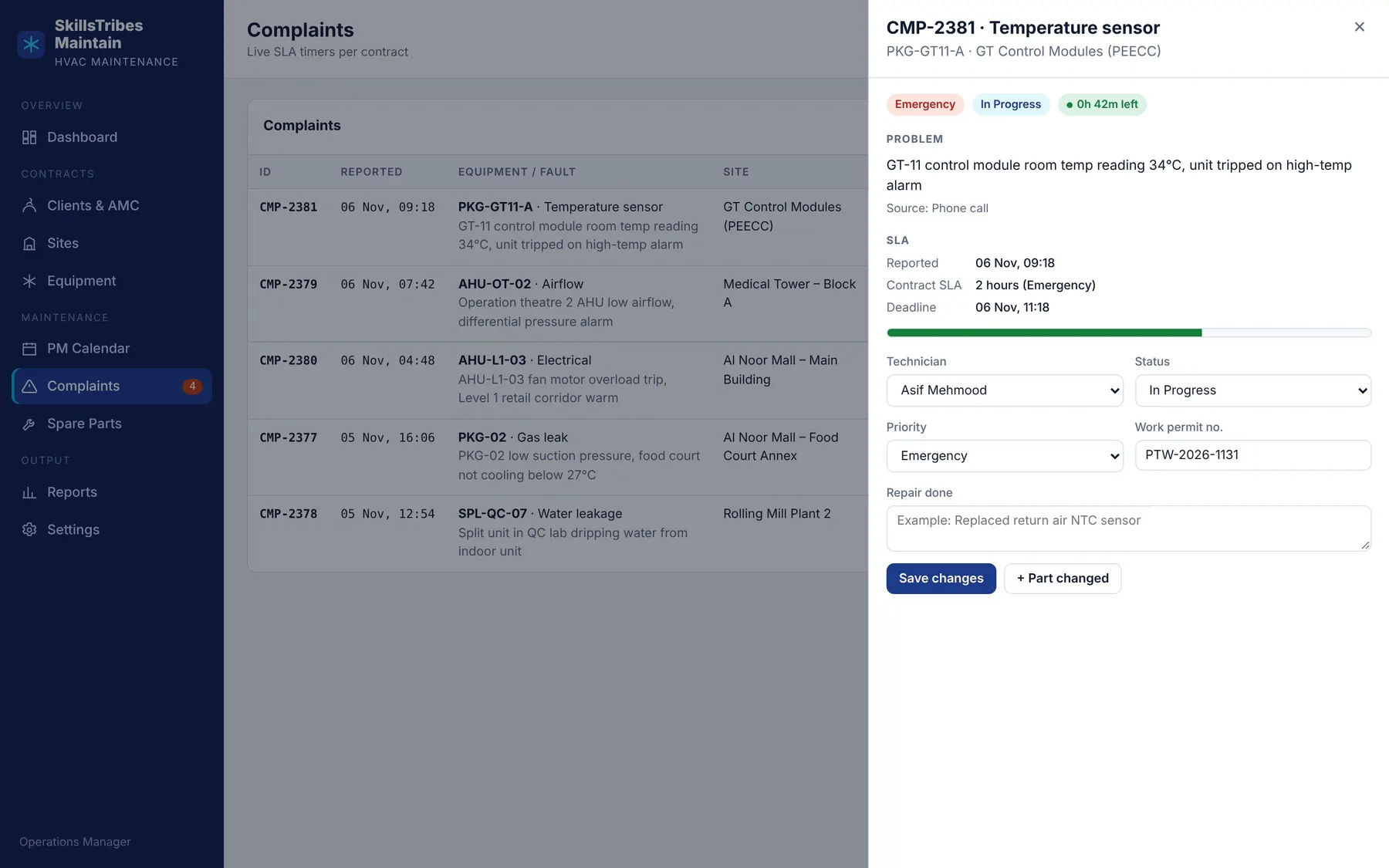
  • Complaints with live SLA timers and a technician on each job
  • Work permit number on every PM and breakdown job
  • Spare parts recorded against the unit and the job

Reports and control

See problems before the client does

  • Dashboard: PM due and overdue, open calls, SLA at risk
  • Repeat faults and repeat parts flagged automatically
  • Monthly report per client: PM done vs planned, SLA met, parts used
  • Client portal: each client sees only their own sites and raises complaints

How it works

From first call to daily use.

  1. Walkthrough

    We show the software on a call, using your own equipment types and checklists.

  2. Your data

    Send your client, site and equipment lists in Excel. We load them and create your logins.

  3. Start on a few sites

    Your office uses it on real contracts while we adjust checklists and reports.

  4. All contracts

    Move every contract in, give your clients their portal logins, and keep asking for changes.

The real software

This is what your office will use.

Screens from the working software, with sample data.

A 44-second tour: dashboard, AMC contracts, equipment, PM calendar, complaints with SLA timers, spare parts, reports and the client portal.

A complaint with its SLA deadline, technician, status and work permit number.
Complaint and SLADeadline from the contract, technician, permit number and the repair done.
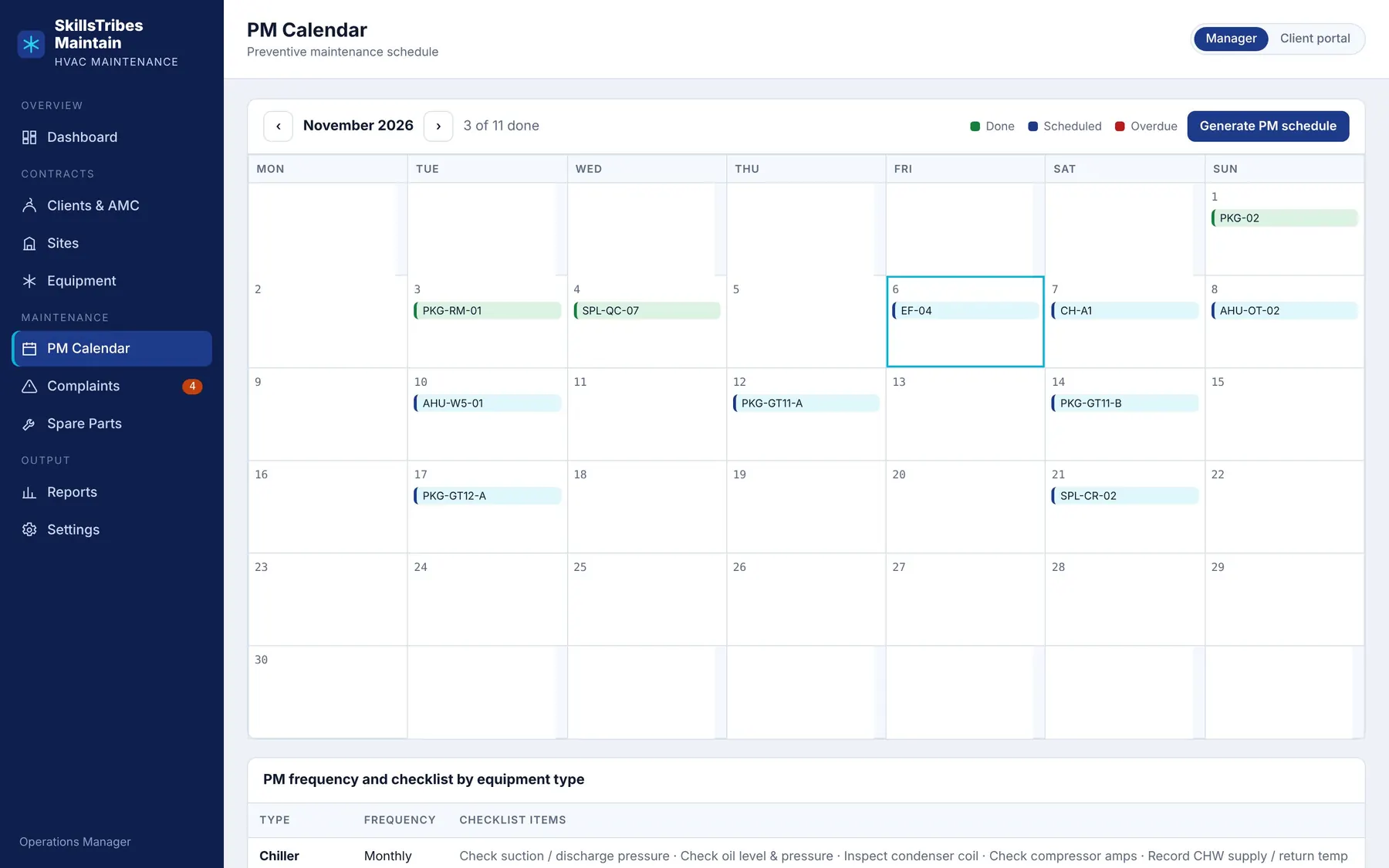
Monthly PM calendar with done, scheduled and overdue jobs.
PM calendarDone, scheduled and overdue PM for the month at a glance.
Equipment history: unit details, QR tag, PM jobs, breakdowns and parts changed.
Unit historyDetails, QR tag, every PM, breakdown and part for one unit.

Where it fits

For the buildings and plants you maintain.

  • Shopping malls
  • Factories
  • Hospitals
  • Power plants
  • Hotels
  • Office towers
  • Residential towers
  • Warehouses

Coming next

Being added now, in this order, with the first contractors who use it.

  • PDF reports sent by email and WhatsApp
  • Invoices with VAT (UAE 5%, KSA 15%)
  • Arabic interface
  • Technician view on the phone
  • Rotating equipment: cooling water and lube oil pumps

Questions

Short answers.

Do we need to install anything?

No. It opens in any browser on a computer, tablet or phone. We host it on a secure HTTPS address with backups.

Can our clients see other clients' data?

No. Each client login sees only that client's sites, equipment, complaints and reports. This is enforced in the database, not only on the screen.

We keep everything in Excel today. Do we start from zero?

No. Send us your client list, sites and equipment list in Excel, and we load them before you start.

Which currencies and countries does it support?

Contracts and parts can be in AED, SAR, USD, QAR, OMR, KWD or BHD. It is built for contractors across the Gulf and Iraq.

How is it priced?

A monthly subscription for your company. Send us the number of sites and units you maintain and we will send you a quote.

Is our data ours?

Yes. On request we give you a full copy of your data in Excel, at any time, including if you decide to stop.

Is it in Arabic?

English today. An Arabic interface is on the list above.

Can it match our own PM checklists?

Yes. Each equipment type comes with a standard HVAC checklist, and we change it to match the checklists in your contracts.
Walkthrough

See it with your own contracts.

Tell us your company and how many sites you maintain. We will set up a walkthrough using a few of your own units and checklists.

WhatsApp us